
 Welcome to EnviroDIY, a community for do-it-yourself environmental science and monitoring. EnviroDIY is part of
 Home › Forums › Mayfly Data Logger › logger stops uploading to Monitor My Watershed at a set duration
- This topic has 3 replies, 2 voices, and was last updated 2026-10-01 at 12:38 PM by
 Sara Damiano.
-
AuthorPosts
-
-
2026-09-23 at 4:40 PM #19969
I recently replaced an OBS-3+ Turbidity Sensor on one of my loggers, which meant I had to update the script. The script that I am using is a modified version of DRWI_SIM7080LTE.ino and the library version is v.0.37.0, previously I was using a library v0.33.2 from 2022. Library v.0.37.0 didn’t initially work with the script until I deleted “&modem.gsmClient” from Creating Data Publisher[s].
Now I am noticing that the logger can only upload data to Monitor My Watershed for 3 hours and 20 minutes before it goes offline. This has happened on two occasions, at first, I thought it was the battery because the last voltage reading was 3.6, but after a replacement battery the last voltage reading was 4.2. When checking the sim card on the hologram website, the sim status is active, and the last closed session is up to date. I haven’t checked on the microSD card yet to see if readings are still happening.
I read on the forum that old scripts may not work well with new libraries, is this the case here? Any other steps I should take?
Thank you.
-
2026-09-25 at 5:49 PM #19971
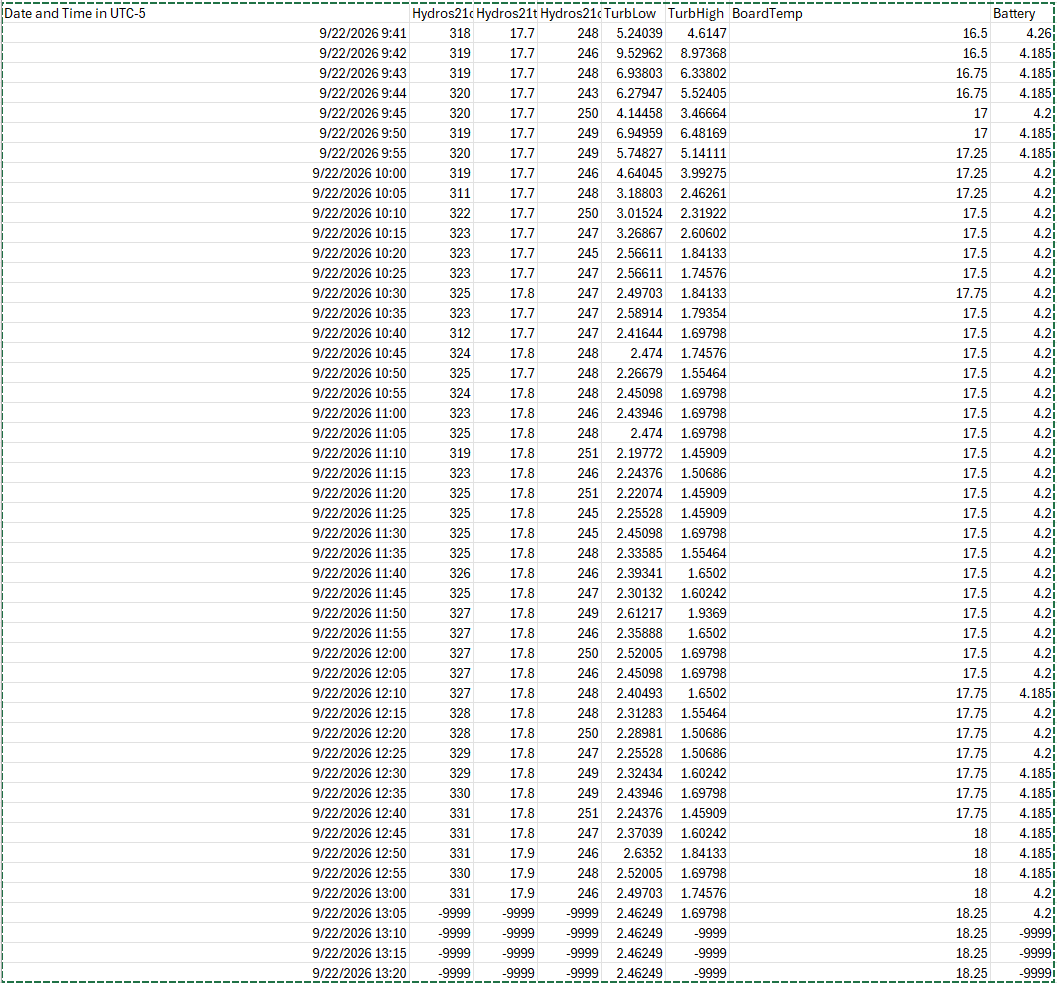
I checked on the sd card and it looks like it is still recording data after it stops sending data to monitor my watershed, but everything is “-9999” except for board temp and TurbLow just registers the last reading. I reuploaded the script, but this time I’m using v.0.33.2 library.
Attachments:
-
2026-09-29 at 11:44 AM #19976
Reverting back to the v0.33.2 library has fixed the issue. Is there something I can edit on my current script to work with the newer library or should I redo it using the DRWI_Mayfly1.ino example script that Sara recommended here: Library issues – EnviroDIY
-
2026-10-01 at 12:38 PM #19977
If you want the updated library, start from the examples for the updated library. It shouldn’t be too hard to update if you’ve mostly stuck to the example. A side-by-side difference viewer would help to check what you need to change. That being said, if everything was working well for you using the old version of the library, you don’t necessarily have to update. Do make sure that all of your other libraries are the expected versions for whichever version of ModularSensors you’re using.
-
-
AuthorPosts


- You must be logged in to reply to this topic.
