
 Welcome to EnviroDIY, a community for do-it-yourself environmental science and monitoring. EnviroDIY is part of
 Home › Forums › Mayfly Data Logger › Library issues
- This topic has 2 replies, 2 voices, and was last updated 2026-08-04 at 5:23 PM by
 Sara Damiano.
-
AuthorPosts
-
-
2026-07-30 at 1:31 PM #19756
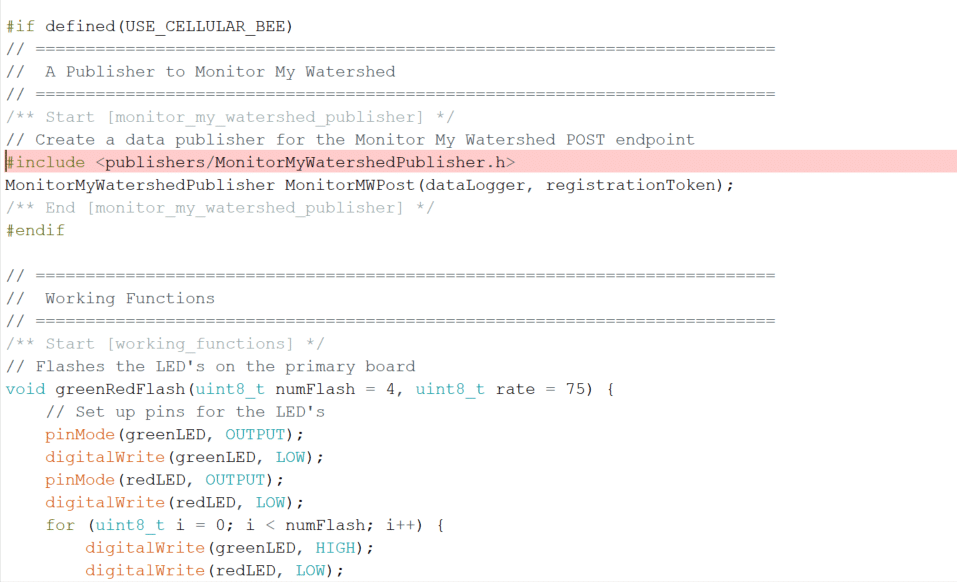
I’m working on building a sensor station using a Mayfly Data Logger v. 1.1, EnviroDIY cellular bee, a Hydros 21 CTD sensor. I am using the sketch EnviroDIY_Monitoring_Kit.ino and the Modular Sensor Libraries v0.37.0. I am having a difficult time getting my sketch to compile. I am receiving the following error that it cant find MonitorMyWatershedPublisher.h. Am I using the correct libraries for this sketch? I’ve attached a photo of my error. Thanks!
fatal error: publishers/MonitorMyWatershedPublisher.h: No such file or directory
#include <publishers/MonitorMyWatershedPublisher.h>
^~~~~~~~~~~~~~~~~~~~~~~~~~~~~~~~~~~~~~~~~~
compilation terminated.
exit status 1
publishers/MonitorMyWatershedPublisher.h: No such file or directory1Attachments:
-
2026-07-30 at 2:12 PM #19758123456789101112131415161718192021222324252627282930313233343536373839404142434445464748495051525354555657585960616263646566676869707172737475767778798081828384858687888990919293949596979899100101102103104105106107108109110111112113114115116117118119120121122123124125126127128129130131132133134135136137138139140141142143144145146147148149150151152153154155156157158159160161162163164165166167168169170171172173174175176177178179180181182183184185186187188189190191192193194195196197198199200201202203204205206207208209210211212213214215216217218219220221222223224225226227228229230231232233234235236237238239240241242243244245246247248249250251252253254255256257258259260261262263264265266267268269270271272273274275276277278279280281282283284285286287288289290291292293294295296297298299300301302303304305306307308309310311312313314315316317318319320321322323324325326327328329330331332333334335336337338339340341342343344345346347348349350351352353354355356357358359360361362363364365366367368369370371372373374375376377378379380381382383384385386387388389390391392393394395396397398399400401402403404405406407408409410411412413414415416417418419420421422423424425426427428429430431432433434435436437438439440441442443444445446447448449450451452453454455456457458459460461462463464465466467468469470471472473474475476477478479480481482483484485486487488489490491492493494495496497498499500501502503504505506507508509510511512513514515516517518519520521522523524525526527528529530531532533534535536537538539540541542543544545546547548549550551552553554555556557558559560561562563564565566567568569570571572573574575576577/** =========================================================================* @example{lineno} EnviroDIY_Monitoring_Kit.ino* @copyright Stroud Water Research Center* @license This example is published under the BSD-3 license.* @author Sara Geleskie Damiano <sdamiano@stroudcenter.org>** @brief Example for DRWI CitSci LTE sites.** Example sketch to be used with the [EnviroDIY Monitoring Station* Kit](https://www.envirodiy.org/product/envirodiy-monitoring-station-kit/).** See [the walkthrough page](@ref example_envirodiy_monitoring_kit) for* detailed instructions.** @m_examplenavigation{example_envirodiy_monitoring_kit,}* ======================================================================= */// The Arduino library is needed for every Arduino program.#include <Arduino.h>// ==========================================================================// Configuration for the EnviroDIY Monitoring Station Kit// ==========================================================================/** Start [configuration] */// Uncomment ONE of the following lines to select the "Bee" module you are// using. If you are not using a Bee module, you can skip this section and the// sections for the modems in the code below.// If you do not have a Bee module, you should comment out both.//#define USE_WIFI_BEE#define USE_CELLULAR_BEE// Add your network information here.// APN for cellular connection#define CELLULAR_APN "YourAPN"// WiFi access point name#define WIFI_ID "YourWiFiSSID"// WiFi password (WPA2)#define WIFI_PASSWD "YourWiFiPassword"/** End [configuration] */// ==========================================================================// Data Logging Options// ==========================================================================/** Start [logging_options] */// Logger ID, also becomes the prefix for the name of the data file on SD cardconst char* LoggerID = "YourLoggerID";// How frequently (in minutes) to log dataconst int8_t loggingInterval = 15;// Your logger's timezone.const int8_t timeZone = -5; // Eastern Standard Time// NOTE: Daylight savings time will not be applied! Please use standard time!/** End [logging_options] */// ==========================================================================// UUIDs and Registration Tokens for Monitor My Watershed// ==========================================================================/** Start [monitor_mw_uuids] */// All UUIDs, device registration, and sampling feature information can be// pasted directly from Monitor My Watershed.// To get the list, click the "View token UUID list" button on the upper right// of the site page.// *** CAUTION --- CAUTION --- CAUTION --- CAUTION --- CAUTION ***// Check the order of your variables this list!!!// They MUST be in EXACTLY this order:// Specific conductance (Meter_Hydros21_Cond)// Water depth (Meter_Hydros21_Depth)// Temperature (Meter_Hydros21_Temp)// Battery voltage (EnviroDIY_Mayfly_Batt)// Percent full scale (EnviroDIY_LTEB_SignalPercent or ESP32_SignalPercent)// Relative humidity (Sensirion_SHT40_Humidity)// Temperature (Sensirion_SHT40_Temperature)// Illuminance (Everlight_AnalogALS_Illuminance)// Temperature (Maxim_DS3231_Temp)// If your variables on Monitor My Watershed are in a different order than the// variableList array, you will need to rearrange the UUIDs below to match this// order. If you don't, your data will be sent to the wrong place on Monitor My// Watershed and will be very difficult to fix after the fact.// *** CAUTION --- CAUTION --- CAUTION --- CAUTION --- CAUTION ***// Replace all of the text in the following section with the UUID array from// MonitorMyWatershed/* clang-format off */// --------------------- Beginning of Token UUID List ---------------------const char *UUIDs[] = // UUID array for device sensors{"", // Specific conductance (Meter_Hydros21_Cond)"", // Water depth (Meter_Hydros21_Depth)"", // Temperature (Meter_Hydros21_Temp)"", // Battery voltage (EnviroDIY_Mayfly_Batt)"", // Percent full scale (EnviroDIY_LTEB_SignalPercent)"" // Temperature (Maxim_DS18B20_Temp)};const char *registrationToken = ""; // Device registration tokenconst char *samplingFeature = ""; // Sampling feature UUID// ----------------------- End of Token UUID List -----------------------/* clang-format on *//** End [monitor_mw_uuids] */// ==========================================================================// Include the libraries required for any data logger// ==========================================================================/** Start [includes] */// Include the main header for ModularSensors#include <ModularSensors.h>/** End [includes] */// ==========================================================================// Logger Pins and Options// ==========================================================================/** Start [logger_pins] */// The name of this program file - this is used only for console printouts at// start-upconst char* sketchName = "EnviroDIY_Monitoring_Kit.ino";// Set the input and output pins for the logger// NOTE: Use -1 for pins that do not applyconst int32_t serialBaud = 115200; // Baud rate for debuggingconst int8_t greenLED = 8; // Pin for the green LEDconst int8_t redLED = 9; // Pin for the red LEDconst int8_t buttonPin = 21; // Pin for debugging mode (i.e., button pin)uint8_t buttonPinMode = INPUT; // mode for debugging pinconst int8_t wakePin = 31; // MCU interrupt/alarm pin to wake from sleepuint8_t wakePinMode = INPUT_PULLUP; // mode for wake pin// Mayfly 0.x, 1.x D31 = A7const int8_t sdCardPwrPin = -1; // MCU SD card power pinconst int8_t sdCardSSPin = 12; // SD card chip select/slave select pinconst int8_t flashSSPin = 20; // onboard flash chip select/slave select pinconst int8_t sensorPowerPin = 22; // MCU pin controlling main sensor power/** End [logger_pins] */// ==========================================================================// The Logger Object[s]// ==========================================================================/** Start [loggers] */// Create a new logger instanceLogger dataLogger(LoggerID, samplingFeature, loggingInterval);/** End [loggers] */// ==========================================================================// Wifi/Cellular Modem Options// ==========================================================================#ifdef USE_WIFI_BEE/** Start [espressif_esp32] */#include <modems/EspressifESP32.h>// Create a reference to the serial port for the modemHardwareSerial& modemSerial = Serial1; // Use hardware serial if possibleint32_t modemBaud = 57600; // Communication speed of the modem// Modem Pins - Describe the physical pin connection of your modem to your board// NOTE: Use -1 for pins that do not apply// Example pins here are for a EnviroDIY ESP32 Bluetooth/Wifi Bee with// Mayfly 1.1const int8_t modemVccPin = 18; // MCU pin controlling modem powerconst int8_t modemResetPin = -1; // MCU pin connected to modem reset pinconst int8_t modemLEDPin = redLED; // MCU pin connected an LED to show modem// status// Network connection informationconst char* wifiId = WIFI_ID; // WiFi access point nameconst char* wifiPwd = WIFI_PASSWD; // WiFi password (WPA2)// Create the modem objectEspressifESP32 modemESP(&modemSerial, modemVccPin, modemResetPin, wifiId,wifiPwd);// Create an extra reference to the modem by a generic nameEspressifESP32 modem = modemESP;/** End [espressif_esp32] */#endif#ifdef USE_CELLULAR_BEE/** Start [sim_com_sim7080] */// For almost anything based on the SIMCom SIM7080G#include <modems/SIMComSIM7080.h>// Create a reference to the serial port for the modemHardwareSerial& modemSerial = Serial1; // Use hardware serial if possibleconst int32_t modemBaud = 57600; // SIM7080 does auto-bauding by default, but// for simplicity we set to 57600// Modem Pins - Describe the physical pin connection of your modem to your board// NOTE: Use -1 for pins that do not applyconst int8_t modemVccPin = 18;const int8_t modemStatusPin = 19; // MCU pin used to read modem statusconst int8_t modemSleepRqPin = 23; // MCU pin for modem sleep/wake requestconst int8_t modemLEDPin = redLED; // MCU pin connected an LED to show modem// status// Network connection informationconst char* apn = CELLULAR_APN; // APN for GPRS connection// Create the modem objectSIMComSIM7080 modem7080(&modemSerial, modemVccPin, modemStatusPin,modemSleepRqPin, apn);// Create an extra reference to the modem by a generic nameSIMComSIM7080 modem = modem7080;/** End [sim_com_sim7080] */#endif// ==========================================================================// Using the Processor as a Sensor// ==========================================================================/** Start [processor_stats] */#include <sensors/ProcessorStats.h>// Create the main processor chip "sensor" - for general metadataconst char* mcuBoardVersion = "v1.1";ProcessorStats mcuBoard(mcuBoardVersion, 5);/** End [processor_stats] */// ==========================================================================// Maxim DS3231 RTC (Real Time Clock)// Built in on Mayfly 0.x and 1.x// ==========================================================================/** Start [maxim_ds3231] */#include <sensors/MaximDS3231.h>// Create a DS3231 sensor objectMaximDS3231 ds3231(1);/** End [maxim_ds3231] */// ==========================================================================// Everlight ALS-PT19 Ambient Light Sensor// Built in on Mayfly 1.x// ==========================================================================/** Start [everlight_alspt19] */#include <sensors/EverlightALSPT19.h>// NOTE: Use -1 for any pins that don't apply or aren't being used.const int8_t alsPower = sensorPowerPin; // Power pinconst int8_t alsData = A4; // The ALS PT-19 data pinconst int8_t alsSupply = 3.3; // The ALS PT-19 supply power voltageconst int8_t alsResistance = 10; // The ALS PT-19 loading resistance (in kΩ)const uint8_t alsNumberReadings = 10;// Create a Everlight ALS-PT19 sensor objectEverlightALSPT19 alsPt19(alsPower, alsData, alsSupply, alsResistance,alsNumberReadings);/** End [everlight_alspt19] */// ==========================================================================// Sensirion SHT4X Digital Humidity and Temperature Sensor// Built in on Mayfly 1.x// ==========================================================================/** Start [sensirion_sht4x] */#include <sensors/SensirionSHT4x.h>// NOTE: Use -1 for any pins that don't apply or aren't being used.const int8_t SHT4xPower = sensorPowerPin; // Power pinconst bool SHT4xUseHeater = true;// Create an Sensirion SHT4X sensor objectSensirionSHT4x sht4x(SHT4xPower, SHT4xUseHeater);/** End [sensirion_sht4x] */// ==========================================================================// Meter Hydros 21 Conductivity, Temperature, and Depth Sensor// ==========================================================================/** Start [hydros21] */#include <sensors/MeterHydros21.h>const char* hydrosSDI12address = "1"; // The SDI-12 Address of the Hydros 21const uint8_t hydrosNumberReadings = 6; // The number of readings to averageconst int8_t SDI12Power = sensorPowerPin; // Power pin (-1 if unconnected)const int8_t SDI12Data = 7; // The SDI12 data pin// Create a Meter Hydros 21 sensor objectMeterHydros21 hydros(*hydrosSDI12address, SDI12Power, SDI12Data,hydrosNumberReadings);/** End [hydros21] *//* clang-format off */// ==========================================================================// Creating the Variable Array[s] and Filling with Variable Objects// ==========================================================================/** Start [variables_separate_uuids] */Variable* variableList[] = {new MeterHydros21_Cond(&hydros), // Specific conductance (Meter_Hydros21_Cond)new MeterHydros21_Depth(&hydros), // Water depth (Meter_Hydros21_Depth)new MeterHydros21_Temp(&hydros), // Temperature (Meter_Hydros21_Temp)new ProcessorStats_Battery(&mcuBoard), // Battery voltage (EnviroDIY_Mayfly_Batt)new Modem_SignalPercent(&modem), // Percent full scale (EnviroDIY_LTEB_SignalPercent)new MaximDS3231_Temp(&ds3231), // Temperature (Maxim_DS3231_Temp)};/* clang-format on */// Count up the number of pointers in the arrayint variableCount = sizeof(variableList) / sizeof(variableList[0]);// Create the VariableArray object and attach the UUIDsVariableArray varArray(variableCount, variableList, UUIDs);/** End [variables_separate_uuids] */// ==========================================================================#if defined(USE_CELLULAR_BEE) || defined(USE_WIFI_BEE)// ==========================================================================// A Publisher to Monitor My Watershed// ==========================================================================/** Start [monitor_my_watershed_publisher] */// Create a data publisher for the Monitor My Watershed POST endpoint#include <publishers/MonitorMyWatershedPublisher.h>MonitorMyWatershedPublisher MonitorMWPost(dataLogger, registrationToken);/** End [monitor_my_watershed_publisher] */#endif// ==========================================================================// Working Functions// ==========================================================================/** Start [working_functions] */// Flashes the LED's on the primary boardvoid greenRedFlash(uint8_t numFlash = 4, uint8_t rate = 75) {// Set up pins for the LED'spinMode(greenLED, OUTPUT);digitalWrite(greenLED, LOW);pinMode(redLED, OUTPUT);digitalWrite(redLED, LOW);for (uint8_t i = 0; i < numFlash; i++) {digitalWrite(greenLED, HIGH);digitalWrite(redLED, LOW);delay(rate);digitalWrite(greenLED, LOW);digitalWrite(redLED, HIGH);delay(rate);}digitalWrite(redLED, LOW);}// Uses the processor sensor object to read the battery voltage// NOTE: This will actually return the battery level from the previous update!float getBatteryVoltage() {if (mcuBoard.sensorValues[PROCESSOR_BATTERY_VAR_NUM] == MS_INVALID_VALUE ||mcuBoard.sensorValues[PROCESSOR_BATTERY_VAR_NUM] == 0) {mcuBoard.update();}return mcuBoard.sensorValues[PROCESSOR_BATTERY_VAR_NUM];}// ==========================================================================// Arduino Setup Function// ==========================================================================void setup() {/** Start [setup_flashing_led] */// Blink the LEDs to show the board is on and starting upgreenRedFlash(3, 35);/** End [setup_flashing_led] */// Start the primary serial connectionSerial.begin(serialBaud);greenRedFlash(5, 50);// Print a start-up note to the first serial portPRINTOUT("\n\n\n=============================");PRINTOUT("=============================");PRINTOUT("=============================");PRINTOUT(F("\n\nNow running"), sketchName, F("on Logger"), LoggerID, '\n');PRINTOUT(F("Using ModularSensors Library version"),MODULAR_SENSORS_VERSION);#if defined(USE_CELLULAR_BEE) || defined(USE_WIFI_BEE)PRINTOUT(F("TinyGSM Library version"), TINYGSM_VERSION, '\n');#endifPRINTOUT(F("Processor:"), mcuBoard.getSensorLocation());PRINTOUT(F("The most recent reset cause was"), mcuBoard.getLastResetCode(),'(', mcuBoard.getLastResetCause(), ")\n");/** End [setup_prints] *//** Start [setup_serial_begins] */// Start the serial connection with the modem#if defined(USE_CELLULAR_BEE) || defined(USE_WIFI_BEE)PRINTOUT(F("Starting modem connection at"), modemBaud, F("baud"));modemSerial.begin(modemBaud);#endif// Start the SPI libraryPRINTOUT(F("Starting SPI"));SPI.begin();#if defined(EXTERNAL_FLASH_DEVICES)PRINTOUT(F("Setting onboard flash pin modes"));pinMode(flashSSPin,OUTPUT); // for proper operation of the onboard flash memory#endifPRINTOUT(F("Starting I2C (Wire)"));Wire.begin();/** Start [setup_logger] */// set the logger IDPRINTOUT(F("Setting logger id to"), LoggerID);dataLogger.setLoggerID(LoggerID);PRINTOUT(F("Setting the sampling feature UUID to"), LoggerID);dataLogger.setSamplingFeatureUUID(samplingFeature);// set the logging intervalPRINTOUT(F("Setting logging interval to"), loggingInterval, F("minutes"));dataLogger.setLoggingInterval(loggingInterval);PRINTOUT(F("Setting number of initial 1 minute intervals to 10"));dataLogger.setStartupMeasurements(10);// Attach the variable array to the loggerPRINTOUT(F("Attaching the variable array"));dataLogger.setVariableArray(&varArray);// set logger pinsPRINTOUT(F("Setting logger pins"));dataLogger.setLoggerPins(wakePin, sdCardSSPin, sdCardPwrPin, buttonPin,greenLED, wakePinMode, buttonPinMode);// Set the timezones for the logger/data and the RTC// Logging in the given time zonePRINTOUT(F("Setting logger time zone"));Logger::setLoggerTimeZone(timeZone);// It is STRONGLY RECOMMENDED that you set the RTC to be in UTC (UTC+0)loggerClock::setRTCOffset(0);#if defined(USE_CELLULAR_BEE) || defined(USE_WIFI_BEE)// Attach the modem and information pins to the loggerPRINTOUT(F("Attaching the modem"));dataLogger.attachModem(modem);PRINTOUT(F("Setting modem LEDs"));modem.setModemLED(modemLEDPin);#endif// Begin the loggerPRINTOUT(F("Beginning the logger"));dataLogger.begin();/** End [setup_logger] *//** Start [setup_sensors] */// Note: Please change these battery voltages to match your battery// Set up the sensors, except at lowest battery levelif (getBatteryVoltage() > 3.4) {PRINTOUT(F("Setting up sensors..."));varArray.sensorsPowerUp();varArray.setupSensors();varArray.sensorsPowerDown();}/** End [setup_sensors] */#ifdef USE_WIFI_BEE/** Start [setup_esp] */PRINTOUT(F("Waking the modem.."));PRINTOUT(F("Attempting to begin modem communication at"), modemBaud,F("baud. This will fail if the baud is mismatched.."));modemSerial.begin(modemBaud);modem.modemWake(); // NOTE: This will also set up the modem// WARNING: PLEASE REMOVE BAUD RATE DETECTION/FORCING FOR PRODUCTION CODE!if (!modem.gsmModem.testAT()) {// If the AT command test fails, chances are it's a baud rate issue. Try// to detect the baud rate and force the baud rate to the correct one.PRINTOUT(F("Attempting to force the modem baud rate."));modem.gsmModem.forceModemBaud(modemSerial,static_cast<uint32_t>(modemBaud));}/** End [setup_esp] */#endif#ifdef USE_CELLULAR_BEE/** Start [setup_sim7080] */modem.setModemWakeLevel(HIGH); // ModuleFun Bee inverts the signalmodem.setModemResetLevel(HIGH); // ModuleFun Bee inverts the signalPRINTOUT(F("Waking modem and setting Cellular Carrier Options..."));modem.modemWake(); // NOTE: This will also set up the modem// WARNING: PLEASE REMOVE BAUD RATE DETECTION/FORCING FOR PRODUCTION CODE!if (!modem.gsmModem.testAT()) {// If the AT command test fails, chances are it's a baud rate issue. Try// to detect the baud rate and force the baud rate to the correct one.PRINTOUT(F("Attempting to force the modem baud rate."));modem.gsmModem.forceModemBaud(modemSerial,static_cast<uint32_t>(modemBaud));}modem.gsmModem.setNetworkMode(38); // set to LTE only// 2 Automatic// 13 GSM only// 38 LTE only// 51 GSM and LTE onlymodem.gsmModem.setPreferredMode(1); // set to CAT-M// 1 CAT-M// 2 NB-IoT// 3 CAT-M and NB-IoT/** End [setup_sim7080] */#endif/** Start [setup_clock] */// Sync the clock if it isn't valid or we have battery to spareif (getBatteryVoltage() > 3.55 || !loggerClock::isRTCSane()) {// Set up the modem, synchronize the RTC with NIST, and publish// configuration information to publishers that support it.dataLogger.makeInitialConnections();}/** End [setup_clock] *//** Start [setup_file] */// Create the log file, adding the default header to it// Do this last so we have the best chance of getting the time correct and// all sensor names correct.// Writing to the SD card can be power intensive, so if we're skipping the// sensor setup we'll skip this too.if (getBatteryVoltage() > 3.4) {PRINTOUT(F("Setting up file on SD card"));dataLogger.turnOnSDcard(true);// true = wait for card to settle after power updataLogger.createLogFile(true); // true = write a new headerdataLogger.turnOffSDcard(true);// true = wait for internal housekeeping after write}/** End [setup_file] *//** Start [setup_sleep] */// Call the processor sleepPRINTOUT(F("Putting processor to sleep\n"));dataLogger.systemSleep();/** End [setup_sleep] */}// ==========================================================================// Arduino Loop Function// ==========================================================================/** Start [simple_loop] */// Use this short loop for simple data logging and sendingvoid loop() {// Note: Please change these battery voltages to match your battery// At very low battery, just go back to sleepif (getBatteryVoltage() < 3.4) {PRINTOUT(F("Battery too low, ("),mcuBoard.sensorValues[PROCESSOR_BATTERY_VAR_NUM],F("V) going back to sleep."));dataLogger.systemSleep();#if defined(USE_CELLULAR_BEE) || defined(USE_WIFI_BEE)} else if (getBatteryVoltage() < 3.55) {// At moderate voltage, log data but don't send it over the modemPRINTOUT(F("Battery at"),mcuBoard.sensorValues[PROCESSOR_BATTERY_VAR_NUM],F("V; high enough to log, but will not publish!"));dataLogger.logData();} else {// If the battery is good, send the data to the worldPRINTOUT(F("Battery at"),mcuBoard.sensorValues[PROCESSOR_BATTERY_VAR_NUM],F("V; high enough to log and publish data"));dataLogger.logDataAndPublish();}#else} else {// If the battery is good enough to log, log the data but we have no// modem so we can't publishPRINTOUT(F("Battery at"),mcuBoard.sensorValues[PROCESSOR_BATTERY_VAR_NUM],F("V; high enough to log data"));dataLogger.logData();}#endif}/** End [simple_loop] */
-
2026-08-04 at 5:23 PM #19765
Ah. That example is written for the current “master” branch of the library, not the latest polished release. I’m way overdue for a new release, but there are some bugs I still need to fix.
Try starting from this example instead, which is matched to library release 0.37.0: https://github.com/EnviroDIY/ModularSensors/blob/v0.37.0/examples/DRWI_Mayfly1/DRWI_Mayfly1.ino
**DO NOT** use the current master branch as of 8/4/2026. There’s definitely a bug in for the SIM7080/EnviroDIY LTE module. Usually I keep the master branch functional and try to keep not-actually-working stuff in other branches, but as of today master is broken.
-
-
AuthorPosts


- You must be logged in to reply to this topic.
