
 Welcome to EnviroDIY, a community for do-it-yourself environmental science and monitoring. EnviroDIY is part of
 Home › Forums › Environmental Sensors › Couldn’t find DTS-12 turbidity sensor address › Reply To: Couldn’t find DTS-12 turbidity sensor address
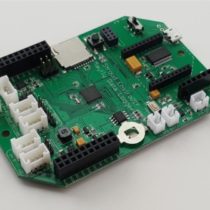
I’m not sure what you mean by “The page says 12V is the default” because the default Grove jack jumper setting of the Mayfly v1.1 boards has always been 3.3v. You have to manually move a jumper if you want to select 5v or 12v for the Grove jacks on the Mayfly v1.1 board. So verify that the jumper next to the Grove jack you’re using for the sensor is set to 12v. It would also be good to use a voltmeter (also known as a multimeter) to measure the voltage you’re applying to the sensor to verify that the voltage is really 12v and isn’t sagging during the motor movement or sensor sampling. It could be that the motor is drawing more current than the Mayfly can supply. The user manual for the DTS-12 says it can draw up to 200mA during wiping, which is right around the upper limit of what the Mayfly v1.1 can supply at 12v. So if you watch the output voltage of the Mayfly with a voltmeter during the wiping action, you should be able to see if it stays near 12v or if it drops. The sensor manual also mentions that the SDI12 sampling commands are different depending on which firmware the sensor has, so you might want to check with the manufacturer to find out what version your sensor is operating with. Have you successfully used that sensor with other dataloggers besides Mayfly boards? You could also try powering the sensor directly from an external 12v battery and only using the data (and ground) lines from the Mayfly to handle the communication. (be sure to connect the ground of the Mayfly board to the ground of the external battery so they’re both using the same ground reference). Then verify that you’re sending the proper sample and measurement report commands according to the tables in the user manual appendix.
