
 Welcome to EnviroDIY, a community for do-it-yourself environmental science and monitoring. EnviroDIY is part of
 Home › Forums › Mayfly Data Logger › Mayfly data logger -9999
Tagged: mayfly data logger
- This topic has 2 replies, 3 voices, and was last updated 2025-10-22 at 10:37 AM by
 Shannon Hicks.
-
AuthorPosts
-
-
2025-10-21 at 4:19 PM #19413
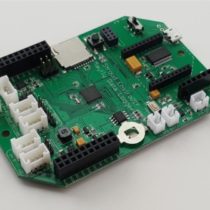
CDT sensor reading on Mayfly monitor reads -9999. Unable to find any issues with sensor, wires. Can’t figure out how to disconnect Grove cable in order to disconnect and reconnect, as per instructional video. Don’t know what a “headphone jack” looks like!
HELP!
-
2025-10-21 at 4:22 PM #19414
How is the sensor connected? To disconnect a grove plug, squeeze the lock at the top of the white connector and pull it off. This is the headphone (stereo) jack: https://www.envirodiy.org/product/envirodiy-grove-to-3-5mm-stereo-jack-pack-of-2/. The stereo/headphone connector is just like the one on wired headphones.
-
2025-10-22 at 10:37 AM #19415
Section 6 of the EnviroDIY Monitoring Station Manual has instructions and photos related to building the station you have. Section 6.3 in particular discusses the Hydros 21 CTD sensor that you’re having trouble with. I’m attaching a screenshot of that section of the manual. You can see in the photos how the sensor cable has a 3.5mm stereo headphone plug on the end of it. EnviroDIY makes and sells the 3.5mm-to-Grove adapter board that lets you connect the sensor to the Mayfly Data Logger’s Grove jacks. Sometimes those stereo jacks get a little corroded inside if a station has been deployed for many years, especially if there’s excess humidity in the enclosure. So when there’s intermittent data or no data from a sensor, we recommend unplugging the sensor from the headphone jack, then reconnecting it, making sure it’s fully seated in the jack as shown in the photos. It’s also good to disconnect and reconnect the Grove cable from the Mayfly board to make sure that connection is good too. If that doesn’t fix your issue, then the next step is to replace the headphone jack, which is available in our Shop.
If there’s still no data from the sensor after making sure the physical connection is good, then it’s likely the sensor died or has a break in one or more wires somewhere along the cable length. This usually means the sensor needs to be replaced since it’s difficult to repair the cable, especially if the internal air pressure vent tube has been damaged as well. To test whether the sensor is really bad, we recommend getting one of the ZSC bluetooth modules from Meter Group (follow the link on the manual webpage), which allows you to see live data directly from the CTD sensor. If that confirms that the sensor has failed, then you’ll need to order a replacement sensor from Meter Group. Once you get a new CTD sensor, you will need to use the ZSC module to configure the sensor with the right SDI-12 channel address. The sensors are shipped from the factory at channel zero, but you need to change it to channel 1 in order for the sensor to work with your Mayfly board. Since your group maintains multiple monitoring stations, all with CTD sensors, having a ZSC module is a really good tool for troubleshooting and maintaining your stations.
Your station also has been having intermittent transmission issues for the past couple months, indicating that there’s a dead battery issue. Looking at the time series graph (screenshot attached), you can see that your battery voltage started dropping at the same time the CTD sensor data disappeared. This is either because the station is staying on longer each measurement cycle in order to retry the connection to the sensor in hopes of getting valid data, or the sensor has failed electrically and is drawing unusually high current during sample periods. Either way, your battery should be replaced with a new, fully-charged one. I think your group has spare batteries and chargers, but if not, there’s a full discussion of options and links for purchasing from different vendors on the Battery options for EnviroDIY Mayfly Data Logger page.
Attachments:
-
-
AuthorPosts




- You must be logged in to reply to this topic.