CloudFlare provides web performance and security solutions, enhancing site speed and protecting against threats.
Service URL: developers.cloudflare.com (opens in a new window)
cf_use_ob
The cf_use_ob cookie informs Cloudflare to fetch the requested resource from the Always Online cache on the designated port. Applicable values are: 0, 80, and 443. The cf_ob_info and cf_use_ob cookies are persistent cookies that expire after 30 seconds.
session
__cfwaitingroom
The __cfwaitingroom cookie is only used to track visitors that access a waiting room enabled host and path combination for a zone. Visitors using a browser that does not accept cookies cannot visit the host and path combination while the waiting room is active.
session
cf_chl_rc_i
These cookies are for internal use which allows Cloudflare to identify production issues on clients.
session
cf_chl_rc_ni
These cookies are for internal use which allows Cloudflare to identify production issues on clients.
session
cf_chl_rc_m
These cookies are for internal use which allows Cloudflare to identify production issues on clients.
session
__cfruid
Used by the content network, Cloudflare, to identify trusted web traffic.
session
__cf_bm
Cloudflare's bot products identify and mitigate automated traffic to protect your site from bad bots. Cloudflare places the __cf_bm cookie on End User devices that access Customer sites that are protected by Bot Management or Bot Fight Mode. The __cf_bm cookie is necessary for the proper functioning of these bot solutions.
session
__cflb
When enabling session affinity with Cloudflare Load Balancer, Cloudflare sets a __cflb cookie with a unique value on the first response to the requesting client. Cloudflare routes future requests to the same origin, optimizing network resource usage. In the event of a failover, Cloudflare sets a new __cflb cookie to direct future requests to the failover pool.
session
_cfuvid
The _cfuvid cookie is only set when a site uses this option in a Rate Limiting Rule, and is only used to allow the Cloudflare WAF to distinguish individual users who share the same IP address.
session
cf_clearance
Whether a CAPTCHA or Javascript challenge has been solved.
session
__cfseq
Sequence rules uses cookies to track the order of requests a user has made and the time between requests and makes them available via Cloudflare Rules. This allows you to write rules that match valid or invalid sequences. The specific cookies used to validate sequences are called sequence cookies.
session
cf_ob_info
The cf_ob_info cookie provides information on: The HTTP Status Code returned by the origin web server. The Ray ID of the original failed request. The data center serving the traffic
session


 Welcome to EnviroDIY, a community for do-it-yourself environmental science and monitoring. EnviroDIY is part of WikiWatershed, an initiative of Stroud Water Research Center designed to help people advance knowledge and stewardship of fresh water.
Very nice project!
Do you have an exemple code with the GPRSbee. I use GPRSbee rev6b + stalker V3.1 but I have some problem with the gprsbee.init.
Thank you,
Eric
We’re working on getting an example sketch for the stations shown in this post, using the GPRSbee cell phone wireless ratio. We’re also working on getting as much code as possible in our EnviroDIY GitHub code repository for the Mayfly: https://github.com/EnviroDIY/EnviroDIY_Mayfly_Logger
Stay tuned!
This might be helpful: http://forum.sodaq.com/t/gprsbee-library/471
Dear Anthony, congratulations. Based on the pictures, I have following practical questions:
1) What solar panel are you using? The solar panel that comes with the Mayfly is much smaller.
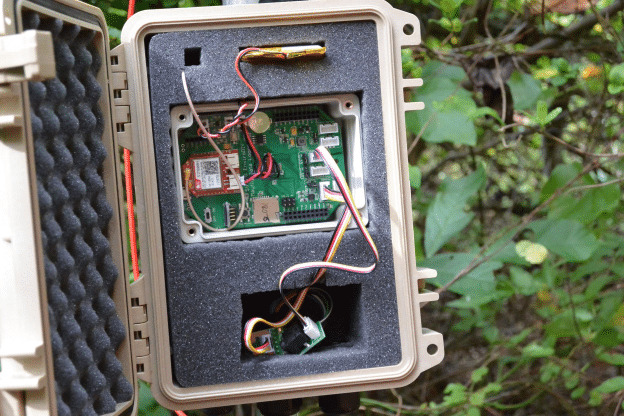
2) Is it acustic material that you use to fill up the space in the box? Has it any other function?
With friendly greetings,
Arnoud
The solar panels in the photos above are made by a company called Voltaic Systems (https://www.voltaicsystems.com/solar-panels). They have a variety of sizes, we prefer the 2W for sunny areas, and 3.5W for shady areas. T he small 0.5w panel that comes with the Mayfly starter kit is not waterproof, but it’s handy if you want to build a small logger and put the panel inside the clear lid of the small Mayfly enclosure.
The Pelican cases we use for our loggers come with foam already inside them, so you simply cut away part of the foam to create spaces for the logger, battery, cables, etc.
That looks very nice. Did you have any ESD-problems with that foam and those cases? I’ve tried to use some fake pelican boxes (made of PE plastic I belive) as enclosures for electronics and had huge problems; as soon as I came close to the box the electronics went crazy.
No, I haven’t had any problems with the foam or the cases. In fact, in some of the loggers in locations with a strong cellular signal, I skip the external antenna for the GPRS module and simply use a small PCB antenna and simply tuck that antenna between the small Mayfly enclosure and the foam.
HI, do you have a diagram or wiring map so I can understand how to connect the OBS sensor to the mayfly data logger please?
Hi @walterartavia02gmail-com,
I haven’t deployed an OBS, but it looks like it goes into the I2C port using the instructions at:
https://github.com/EnviroDIY/ModularSensors#campbell-scientific-obs-3
where it says that, “The power supply is connected to the red wire, low range output comes from the blue wire, high range output comes from the white wire, and the black, green, and silver/unshielded wires should all be connected to ground.”
Beth, thanks for sending Walter the links to the sensor description in the Modular Sensors library ReadMe file! That is a great resource.
One important correction, the Campbell Sci. OBS3+ sensor is an ANALOG sensor, and therefore should be connected to one of the Aux Analog grove ports on the Mayfly’s lower left side. The Auxiliary Analog-to-Digital Converter (ADC) chip is, however, an I2C device, which is why the description mentions I2C.
Walter, if you read that ModularSensors sensor description carefully, you’ll also see that the OBS3+ works better with 5V of power, so you should move the power jumper on the Mayfly for the Aux Analog from switched 3.3V to switched 5V.
Thanks a lot Anthony / Fisherba, I will work on the MayFly and the OBS on the weekend!.
Hi fisherba, thanks a lot for the help, as soon I arrive to my office will work on it. I will like to ask you if you had work with any turbidity sensor in special?, I’m looking to deploy at last 14 of those sensor spread out in fresh water tanks.
Hi @walterartavia02gmail-com, I completely missed this turbidity question. We have used Yosimetech (http://www.yosemitech.com/en/) turbidity sensors, but there’s enough hassle in ordering (customs hang-ups every time) and creating a RS-485 shield to communicate with those, that going with the Campbell sensor might be in my future.